Skip to content

Technology · Content management system

Custom WordPress development

Your site already runs on WordPress and does almost everything you need. What's missing isn't solved by one more plugin from the directory: it's a rule of your business, a connection to another system or a bug nobody has managed to fix. We program that piece on top of what you have, without rebuilding the site.

Often combined with

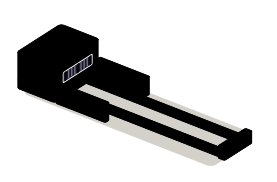
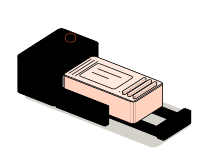
Fig. 01Assembly benchCUSTOM · PLUGINLooping
The cartridge slides into the connector and the site gains a feature: the new block appears on the page and the admin panel shows it as active.

Situations

What you can solve with WordPress development

These jobs start with a site that works. The point isn't to switch platforms; it's to make WordPress do what your business needs and doesn't do today.

  • The feature no plugin offers

    A quote calculated from your rates, a booking with your rules or an area where each customer sees only their own. It is built as your own plugin, with a settings screen in the admin.

  • Data copied by hand

    Orders, contacts or sign-ups leave WordPress and someone retypes them into the CRM or the ERP. An integration sends them on its own and keeps a record of every delivery.

  • A bug that comes back with every update

    The site breaks on update, a form never arrives or checkout fails now and then. We reproduce the failure, find the cause and fix it where it starts, not on top of it.

  • A site that has been outgrown

    New content types, custom fields, user roles or a store that keeps growing. The site evolves on top of what already works instead of starting over.

The connector: where the new feature joins the site

What to check before starting

  • The WordPress and PHP versions, and who manages the hosting
  • The active theme and plugins, and which ones were edited by hand
  • Whether there is a staging copy to rehearse on without touching the live site
  • Which outside system is involved and what it lets you read or write

Services

What we build on WordPress

Four kinds of job. A project usually combines two: a new feature and the connection that feeds it.

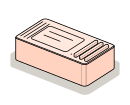
  • Module 1 · Cartridge

    Custom plugins and features

    Your own code that adds what the business needs and switches on and off like any plugin. It survives a theme change and a WordPress update.

    Examples of deliverables

    • Quote calculator
    • Bookings with your own rules
    • Private customer area
  • Module 2 · Connector

    Integrations with other systems

    WordPress sends data to and receives it from your CRM, your ERP, your payment gateway or your email tool, with retries and a log of what went out.

    Examples of deliverables

    • WooCommerce orders to the ERP
    • Forms to the CRM
    • Stock and prices in sync
  • Module 3 · Panel

    Bug fixing and performance

    Diagnosis of failures, plugin conflicts, slow queries and admin screens that drag. Every fix is tested on a copy before it goes live.

    Examples of deliverables

    • Conflict between two plugins
    • A form that doesn't send
    • A slow admin panel
  • Module 4 · Modular site

    Evolving an existing site

    Content types, fields and custom editor blocks, so your team can publish without touching code or breaking the design.

    Examples of deliverables

    • Custom editor blocks
    • Content types and custom fields
    • Editing roles and permissions

A working example

A form that saves to WordPress and notifies the CRM

An illustrative example with made-up data. Send the request and follow it: first it is saved as an entry in WordPress, then it goes out to the CRM. Try it with the CRM not answering, too.

Simulated demo · sample data

Form on the website

Untick it to see what happens when the other system doesn't reply.

What happens to the data

  1. Form validated
  2. Saved in WordPress
  3. Sent to the CRM

Entries saved in WordPress

No entries yet. Send the first one.

There is no WordPress and no CRM behind this demo: the journey is simulated in your browser and nothing you type is sent anywhere.

Integration

How it fits with your systems

A WordPress site rarely works alone. It usually takes data from one place and has to leave a record in another; the custom piece sits between the two.

Where it comes from

  • Your current WordPresstheme, plugins and content
  • WooCommerceorders, customers and stock
  • Forms and userssign-ups and requests
WordPressCustom plugin or integrationvalidates, saves and sends

Where it goes

Dependencies worth checking

  • Whether the hosting allows scheduled tasks and outbound connections
  • Which API the other system offers, and its limits
  • Which other plugins touch the same data
  • Who will update WordPress afterwards, and how often

How we work and what we deliver

How we run a WordPress job

  1. 01

    Initial review

    We look at the install: versions, theme, plugins and the bug or the need, reproduced on a copy.

  2. 02

    Scope

    We write down what the piece will do, what it won't and which outside system it touches. If an existing plugin already does it well, we say so.

  3. 03

    First release

    The feature installed on staging, with your data rather than demo data.

  4. 04

    Validation

    You test it with real cases, including the one that fails. It goes live when you sign off.

  5. 05

    Documentation

    What the plugin does, how to configure it, how to switch it off and what to check when WordPress updates.

What you get when the job closes

  • The plugin code in a repository in your name
  • Installation on staging and on the live site
  • A usage and maintenance guide
  • The list of what was left out, and why

Questions

Questions about WordPress

Missing yours? Write it to info@veodar.com and we'll reply with a specific question, not a brochure.

Do I have to rebuild the site to add a feature?

No. The usual route is to build it as your own plugin on top of the site you have. A rebuild only pays off when the theme or the install makes reliable work impossible, and in that case we say so before quoting.

What happens to custom code when WordPress updates?

The code lives in a separate plugin, not inside the theme or the core, so an update doesn't erase it. A new version can still change behavior, which is why the handover includes a note on what to check after updating.

Can you work on the theme or page builder I already use?

Yes, as long as we can read how it is put together. We review the theme, the builder and the active plugins first; if one of them blocks what is needed, we explain it along with the alternatives.

Can you connect WordPress to my CRM or ERP?

If that system offers an API or some way to import and export data, yes. We check it at the start: what it lets us read, what it lets us write and with which limits. The scope is written with that in front of us.

What if I only need a bug fixed?

That is a job too. We reproduce the failure on a copy, locate the cause and deliver the fix with an explanation of what triggered it, so it doesn't return with the next update.

Updated:

Other technologies

What it is combined with

All technologies
  • Web development with AstroCompany websites, catalogs and content sites. Development, migrations and integration with content management systems, with performance in mind.
  • JavaScript programmingCalculators, filters, validation and interactions for your website. New features and problem-solving in the code you already have.
  • Node.js backendAPIs, connections between systems and background processes. We automate the exchange of information between your website and your business tools.

Get started

Tell us what your WordPress is missing.

The site's address and one sentence about what it should do are enough for a first answer.

What helps us assess it

  • The site's address
  • What it should do and doesn't today
  • Which other systems are involved
  • Whether there is a staging copy or hosting access

Before you write, see how we price a project or our solutions by department.

Fig. 07Morse keyH · E · L · L · O