Skip to content

Technology · Microsoft platform

Desktop application development with .NET

.NET is Microsoft’s platform for writing applications, and on Windows it is still the most direct way to build line-of-business programs: many screens, a lot of data, printing and integration with the rest of the office. We build new applications in .NET and modernize the ones that have been running for years, without stopping the work of the people who use them.

Often combined with

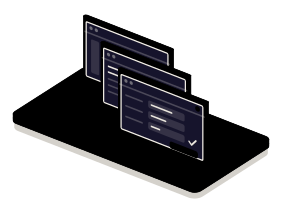
Fig. 01Desk of windowsDIRECTORYstockcustomersorderLEGACYCURRENT .NETLEGACYFORM · REPORT · MIGRATIONLooping
Three cascaded windows on the desk: the form marks what does not add up and the report leaves by the printer. To the right, a jack lifts the old module to the new base.

Situations

What you can solve with a .NET application

.NET pays off when the application lives on Windows, inside a company, and has to get along with what is already there: the directory, the printers, Office, the database server.

  • A line-of-business application with many screens

    Record entry, queries, editable grids and validations. The .NET tools are made for that and give a Windows interface with no surprises.

  • An old program that cannot be switched off

    Built years ago in Windows Forms or on a version of .NET that no longer gets patches, and the business depends on it. It is moved to the current platform in parts, with the application in use.

  • Reports, labels and documents

    Printing properly, generating Excel, Word or PDF in the format the company uses and sending each document to its printer without asking.

  • Integration with the Windows environment

    Sign-in with company accounts, Windows services, shared folders, devices with their own drivers or old components that only exist there.

The window that validates: what does not add up is marked before it is saved

What to check before starting

  • Which version of .NET and which interface technology it is built with, if it exists
  • Which versions of Windows are on the workstations
  • Which database, which reports and which third-party components it uses
  • Whether it also has to work outside Windows

Services

What we build with .NET

Four kinds of job. The third is the most common: an application that works, on a base that has aged.

  • Module 1 · Windows

    New line-of-business applications

    Desktop programs for Windows with their forms, grids, searches and permissions, connected to your database or your API.

    Examples of deliverables

    • Warehouse or production management
    • Service desk with customer record
    • Internal administration tool
  • Module 2 · Printer

    Reports, printing and Office

    Reports in the company’s format, export to Excel, Word and PDF, labels and direct printing to the right printer at each workstation.

    Examples of deliverables

    • Report with totals and signatures
    • Export to Excel
    • Labels on a thermal printer
  • Module 3 · Jack

    Modernizing legacy applications

    Moving from .NET Framework to current .NET and from old screens to a modern interface, module by module, with the application running in the meantime.

    Examples of deliverables

    • Move from .NET Framework to current .NET
    • Replacing an unsupported component
    • Module-by-module migration plan
  • Module 4 · Directory tower

    Integration with Windows and with Rust

    Company accounts, Windows services, devices and old components; and, when speed is needed, a Rust library called from .NET.

    Examples of deliverables

    • Sign-in with company accounts
    • Windows service in the background
    • Rust library called from .NET

A working example

An order that validates and totals itself

Working example with fictitious data. Change quantities and discounts in the grid: the totals are recalculated and the window marks what does not add up. Generate the report once it is correct.

Working example · sample data

Order 0142 · Example Workshops
ItemQuantityPriceDisc. %Amount
Bearing 6204
Timing belt
Hydraulic oil 5 l
Subtotal
VAT 21%
Total

Order correct

Report

The report appears here once the order is correct.

The window is drawn in your browser and is not a Windows application: it imitates the behavior of a line-of-business form with its bound data. The items, the amounts and the customer are made up.

Integration

How it fits with your systems

A .NET application is rarely alone in the office. It normally reads from a data server, writes documents and leans on what Windows already offers.

Where it comes from

  • Your databaseSQL Server or another
  • Company accountswho gets in and with which permissions
  • Devices and peripheralsprinters, readers, scales
.NETDesktop application in .NETforms, rules and reports

Where it goes

Dependencies worth checking

  • Which third-party components it uses and whether they have a version for current .NET
  • Which parts depend on technologies Microsoft no longer maintains
  • How it is installed and updated on the workstations
  • Whether there are users outside Windows or working remotely

How we work and what we deliver

How we work on a .NET job

  1. 01

    Initial review

    We look at the application or the need: screens, data, reports, .NET version and which machines are on the workstations.

  2. 02

    Scope

    We write down which screens and which reports are in, in which order the old part is migrated and what is left out.

  3. 03

    First release

    An installable version with the first screens, against a copy of your data.

  4. 04

    Validation

    The person who uses it every day tests it, at their workstation and with their printer, next to the old application.

  5. 05

    Documentation

    How it is compiled, installed and updated, and what is left to migrate.

What you get when the job closes

  • The code in a repository in your name
  • The signed installer and its update
  • The plan for what is left to modernize
  • The list of what is left out, and why

Questions

Questions about .NET

Missing yours? Write it to info@veodar.com and we'll reply with a specific question, not a brochure.

.NET or Tauri for a new application?

If it will only be used on Windows, is line-of-business and has many data screens, .NET is usually the most direct. If it also has to run on macOS or Linux, or reuse a web interface, Tauri fits better. We decide with the case in front of us, and sometimes they live together: interface in .NET and calculation in Rust.

Does my Windows Forms application have a future?

Windows Forms still works and Microsoft maintains it in current .NET, so there is no urgency about the interface. What is worth doing is leaving old versions of .NET Framework and unsupported components behind. The engine can be modernized without touching the screens yet.

Does work have to stop in order to migrate?

No. The migration is done by modules and the two versions live together on the same database while it lasts. Each part is switched once the person who uses it has tested it.

Does it work outside Windows?

Current .NET runs on Windows, macOS and Linux, but the classic desktop interfaces are Windows only. For an application on several systems there are options inside .NET and outside it; we compare them with you.

Can it connect to old programs?

Almost always. .NET gets along with native libraries, old Windows components, veteran databases and files in proprietary formats. What we review is whether those components still have someone maintaining them.

What if one part needs a lot of speed?

That part is written in Rust and called from .NET like one more library. The application keeps its screens and gains a fast engine exactly where it needs it.

Updated:

Other technologies

What it is combined with

All technologies
  • Rust developmentApplications, services and modules that cannot fail or run slow. We write the core of your product in Rust, or the piece that is holding it back today.
  • Signing and automatic updatesSigned installers the system accepts without warnings and new versions that reach every workstation by themselves, with a rollback if something fails.
  • Offline data with SQLiteThe app stores and queries on the phone itself and syncs when coverage returns. We design the local model, the change queue and the encryption.

Get started

Tell us which Windows application you need or have.

Knowing what it does, how many workstations use it and what it is built with is enough for a first answer.

What helps us assess it

  • What it does and how many workstations use it
  • Which technology and version it is built with, if it exists
  • Which database and reports it handles
  • What you would like to change first

Before you write, see how we price a project or our solutions by department.

Fig. 07Morse keyH · E · L · L · O