
Skip to content

Technology · Apps for iOS and Android

App development with React Native

React Native lets you write the app once and publish it on iPhone and on Android, with screens made of each system's own components. We build new apps this way, and we also continue, update or rescue the ones already built with React Native.

Often combined with

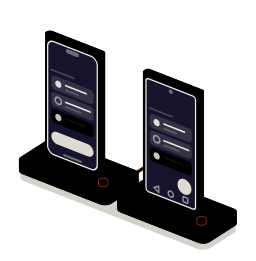
Fig. 01Twin-output bench9:41Report 0142ONE CODE · TWO SYSTEMS9:41Report 0142Looping
A change at the console runs down the bridge and reaches both phones at once: the same screen on iPhone and on Android, each with the controls of its system.

Situations

What you can solve with a React Native app

React Native pays off when the app has to be on both systems and there is no reason to write it twice. Most of the code is shared; what belongs to each phone is programmed separately, only where it is needed.

  • An app for iPhone and Android at once

    One team, one codebase and one list of pending work. Both versions ship together and do the same thing, each with the gestures and controls of its system.

  • An app that exists and nobody maintains

    It was left on an old version, the stores ask for an update or it fails on new phones. It is brought up to date step by step, without a rewrite, and published again.

  • A feature that depends on the phone

    Scanning codes with the camera, printing over Bluetooth, taking payments on a terminal or tracking a route. It is programmed as a native module and the rest of the app uses it like any other piece.

  • The same logic in the app and on the web

    If your website is already built in React, the business rules, the validation and the connection to your server are shared instead of written twice.

The bridge: one line of code split into two outputs

What to check before starting

  • Which phones and which iOS and Android versions it has to run on
  • Which phone features it uses: camera, location, Bluetooth, notifications
  • Whether an app or starting code already exists, and on which version
  • Who holds the Apple and Google developer accounts

Services

What we build with React Native

Four kinds of job. A new app usually starts with the first and needs the second at some point.

  • Module 1 · Twin output

    Apps for iPhone and Android

    The whole app from a single codebase: navigation, screens, forms and the connection to your server. It is tested on real phones of both systems before every release.

    Examples of deliverables

    • Work report app
    • Customer area on mobile
    • Order app for sales reps
  • Module 2 · Native module

    Native modules and hardware

    When the app needs something only the phone can do, it is written in each system's language, Swift or Kotlin, and offered to the rest of the app through one interface.

    Examples of deliverables

    • Camera code scanner
    • Bluetooth printer or scale
    • NFC tags
  • Module 3 · Console

    Maintenance and upgrades

    Upgrading React Native and its dependencies, moving to the current architecture, fixing crashes and store rejections.

    Examples of deliverables

    • Staged version upgrade
    • Crashes at launch on new phones
    • A new store requirement
  • Module 4 · Web output

    Logic shared with your website

    The business rules, the data types and your API client live in a common package used by the app and the website. A rule changes once.

    Examples of deliverables

    • Shared form validation
    • Shared API client
    • Same permissions on web and app

A working example

One work report, two phones

Illustrative example on made-up data. Add a task, mark it done or change the technician: both phones respond at once because they run the same code. Notice also what is not the same.

Example · sample data

The shared code

What they share

  • The task list and its state
  • The rule: no closing with tasks pending
  • The assigned technician and saving

What belongs to each system

  • The shape of the checkbox and the button
  • How it says something is missing
  • The bottom bar and the back gesture

Both phones are drawn in your browser: no app is installed and nothing is sent. What it shows is the real split between shared code and the pieces that belong to each system.

Integration

How it fits your systems

An app is the visible part of something that already exists: your data, your users and your processes. React Native takes care of the phone; the rest gets connected.

Where it comes from

React NativeReact Native appone codebase, two systems

Where it goes

Dependencies worth checking

  • Which API exists today and whether it was designed for an app or only for the web
  • How users sign in and whether the session has to last for days
  • What has to keep working without coverage
  • Which third-party libraries the app uses and whether they are still maintained

How we work and what we deliver

How we run a React Native job

  1. 01

    Initial review

    We look at what exists: the code if there is any, the store accounts, the phones the team has and what the app has to do.

  2. 02

    Scope

    We write down the screens, what is shared and what needs a native module, and what stays out of the first version.

  3. 03

    First release

    A version you can install on your phones, on both systems, with the main flow working against real data.

  4. 04

    Validation

    The people who will use it test it, on their phones and where they work. What fails there is fixed before publishing.

  5. 05

    Documentation

    How it is built, how a new version is published and what to check when Apple or Google change their requirements.

What you get when the job closes

  • The code in a repository in your name
  • The app published from your Apple and Google accounts
  • A guide to building and publishing versions
  • The list of what is left out, and why

Questions

Questions about React Native

Missing yours? Write it to info@veodar.com and we'll reply with a specific question, not a brochure.

Does the app feel as smooth as a native one?

In business apps, with lists, forms, maps and the camera, the difference is rarely noticeable: the screens are the system's own components. Native code is worth it for very demanding graphics or features tied closely to the device, and that is decided before starting.

Does the same code work for the web?

The interface doesn't, the logic does. Business rules, validation and access to your API can be shared with a React website. Screens are written for each medium because a phone and a browser are not used the same way.

Can you continue a React Native app another team started?

Yes. First we build it and review it: version, unmaintained dependencies and untested parts. With that in front of us we tell you what can be continued as it is and what is better redone, before committing to anything.

What happens when a new version of iOS or Android comes out?

Requirements change every year, and sometimes behavior does too. The app is delivered with a note of what to check on each new version, and maintenance, if you contract it, includes those reviews.

React Native, or a native app in Swift and Kotlin?

It depends on how much of the app is shared. If almost everything is screens and data, one codebase saves duplicated work. If the app lives off a feature very specific to one system, the watch or a rugged work device for example, going native usually pays off. We weigh it with you on the actual case.

Is Expo required?

It isn't mandatory, but today it is the recommended way to start a React Native project and it simplifies building, publishing and updating. On an existing app without Expo we can keep working the same way or bring it in piece by piece.

Updated:

Other technologies

What it is combined with

All technologies
  • Expo app developmentCloud builds, store publishing and updates that do not wait for a new version. We set up the project or migrate the one you already have.
  • Offline data with SQLiteThe app stores and queries on the phone itself and syncs when coverage returns. We design the local model, the change queue and the encryption.
  • React developmentDashboards, search and complex forms. Interfaces connected to your data, to look things up and get tasks done from the browser.

Get started

Tell us what app you have in mind.

One sentence about what it should do and on which phones is enough for a first answer. If it already exists, even better.

What helps us assess it

  • What the app should do and who will use it
  • Whether an app or code already exists
  • Which of your systems it has to read or write
  • Whether you have Apple and Google developer accounts

Before you write, see how we price a project or our solutions by department.

Fig. 07Morse keyH · E · L · L · O